Don't Buy the Gravastar Mercury K1 Until You Read This Full Analysis
In a world where mechanical keyboards are increasingly becoming expressions of personal style rather than just simple input devices, few brands have dared to venture as far into the avant-garde as Gravastar. Historically known for their "sci-fi "mecha" inspired bluetooth speakers and gaming mice, the company has recently turned its attention to the enthusiast keyboard market. The result is the Gravastar Mercury K1, a keyboard that looks like it was salvaged from a futuristic shipwreck or a cyberpunk battlefield. However, for the discerning buyer, a keyboard is much more than its outer shell. While the aesthetic appeal is undeniable, the true value of a peripheral lies in its tactile feedback, software reliability, build quality, and long-term ergonomics.
Potential buyers are often lured in by the aggressive, skeletal design and the promise of a premium typing experience. Yet, at its price point, the Mercury K1 enters a fiercely competitive arena filled with established giants and boutique custom keyboard manufacturers. This analysis aims to peel back the layers of the K1’s magnesium alloy frame to determine if there is technical substance beneath the stylistic flair, or if this is a case of form over-functioning for the modern professional and enthusiast gamer.
The Industrial Design Philosophy
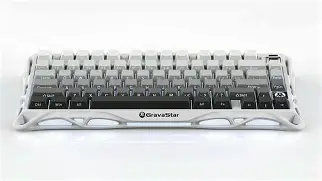
The standout feature of the Gravastar Mercury K1 is undoubtedly its chassis. Eschewing the traditional "plastic box" or even the standard "aluminum slab" designs seen in typical high-end keyboards, Gravastar has utilized a die-cast magnesium alloy frame. This material choice is significant; magnesium alloy is lighter than aluminum but offers a high strength-to-weight ratio and excellent damping properties. The skeletal, "hollowed-out" design is not just for show; it contributes to a unique acoustic profile that differs from the resonance found in solid metal cases.
The keyboard follows a 75% layout, which has become the "goldilocks" standard for enthusiasts. It retains the essential function row and arrow keys while stripping away the number pad to save desk space and improve ergonomics by allowing the mouse to be closer to the user’s center. The geometric cutouts across the frame allow the internal RGB lighting to bleed through in a way that feels intentional rather than accidental. This design language is consistent with Gravastar's "War Zone" aesthetic, featuring weathered textures and intricate detailing that looks handcrafted.
Technical Specifications and Performance
Beyond the skeletal exterior, the Mercury K1 is built upon a modern PCB (Printed Circuit Board) that supports a variety of connection modes. As is standard for premium boards in 2024, it offers "tri-mode" connectivity: wired USB-C, 2.4GHz wireless via a dedicated dongle, and Bluetooth 5.0. In real-world testing, the 2.4GHz connection is the most critical for gamers, providing a 1,000Hz polling rate that ensures latency is virtually indistinguishable from a wired connection. For productivity users, the Bluetooth mode allows for pairing with up to three devices, making it a viable tool for those who jump between a desktop, a laptop, and a tablet.
The switches included with the Mercury K1 are of high importance. Gravastar has opted for pre-lubed linear switches in most configurations, which are designed for speed and smoothness. The hotswappable PCB is a major win here, supporting both 3-pin and 5-pin mechanical switches. This means that if a user finds the stock switches too light or too heavy, they can easily replace them without needing a soldering iron. This "future-proofing" is essential for any keyboard marketed toward the enthusiast crowd.
Typing Experience and Acoustics
A keyboard's "feel" is subjective, but its "sound" is often a marker of quality. The Mercury K1 employs a multi-layer gasket mount system. Gasket mounting involves sandwiching the plate and PCB between pieces of silicone or foam, preventing the internal components from making direct contact with the hard metal case. The result is a slightly cushioned typing feel that reduces finger fatigue during long sessions. Acoustically, the K1 leans toward a "clacky" rather than "thocky" sound. The magnesium frame and the hollow spaces create a crisp, high-frequency sound signature that may polarize users who prefer the deep, muted thud of heavily dampened boards.
Shop the latest Laptops & Computers picks on Amazon.
See Deals →The keycaps are typically made of PBT (Polybutylene Terephthalate) with dye-sublimated legends. PBT is superior to the cheaper ABS plastic found on many consumer laptops and keyboards because it resists the "shine" caused by finger oils over time and has a more textured, premium feel. The legends are clear and well-aligned, though the font choice leans heavily into the futuristic aesthetic, which may slightly hinder readability for those who are not touch-typists.
Pros and Cons
- Unrivaled Aesthetic: The magnesium alloy skeletal frame is a work of art that stands out in a market of rectangular blocks.
- Premium Build Materials: Magnesium alloy is more expensive and difficult to manufacture than aluminum, offering a unique weight and durability.
- Versatile Connectivity: Tri-mode support allows for seamless switching between gaming rigs and work stations.
- Hotswappable PCB: Allows for endless customization of switches, extending the life of the board.
- Effective Gasket Mount: Provides a soft, flexible typing experience that is easy on the joints.
- Dust Accumulation: The skeletal, open-frame design is a magnet for dust and debris, requiring more frequent cleaning than closed-case boards.
- Software Limitations: While functional, the proprietary software for remapping keys and controlling RGB is not as polished as industry leaders like VIA or QMK.
- Acoustic Profile: The hollow nature of the design may produce a metallic ping or higher-pitched sound that some enthusiasts find distracting.
- Portability: While lighter than some all-aluminum boards, the irregular shape and sharp angles make it difficult to slide into a standard laptop sleeve.
Feature Comparison: Mercury K1 vs. Traditional 75% Keyboards
To understand where the Mercury K1 sits in the broader market, it is helpful to compare it against the general standards of the 75% mechanical keyboard category.
| Feature | Gravastar Mercury K1 | Generic Premium 75% Board | Budget Mechanical 75% |
|---|---|---|---|
| Case Material | Die-cast Magnesium Alloy | CNC Aluminum | ABS Plastic |
| Mounting Style | Gasket Mount | Gasket or Tray Mount | Tray Mount |
| Connectivity | Wired/2.4GHz/BT 5.0 | Wired (usually) | Wired only |
| Switch Type | Hotswappable (5-pin) | Hotswappable (5-pin) | Fixed or 3-pin Hotswap |
| Weight | Medium-Light (Magnesium) | Heavy (Aluminum) | Light (Plastic) |
Buying Guide: Who is the Mercury K1 For?
Before committing to a purchase, potential buyers should evaluate their specific needs against what the Mercury K1 offers. This is not a "one size fits all" peripheral, and its specialized nature makes it better suited for certain environments over others.
The Aesthetic Enthusiast
If your primary goal is to create a desk setup that looks like a high-end concept art piece, the Mercury K1 is virtually without peer. It serves as a centerpiece, especially for those who already own other Gravastar products or who lean into the cyberpunk/techwear aesthetic. The way the RGB interacts with the magnesium frame creates a lighting effect that standard "floating key" designs cannot replicate. If "cool factor" is your top priority, the K1 delivers in spades.
The Competitive Gamer
For gamers, the low-latency 2.4GHz wireless connection is the main draw. The 75% layout provides more room for large mouse sweeps in FPS games compared to full-sized boards. However, serious competitive players should note that the K1 does not currently feature magnetic (Hall Effect) switches, which are becoming popular for their adjustable actuation points. While the mechanical switches included are excellent, those looking for the absolute cutting edge in rapid-trigger technology might find the standard mechanical nature of the K1 slightly traditional.
The Professional Writer or Coder
Professionals who spend 8 to 10 hours a day typing will appreciate the gasket mount and the PBT keycaps. The tactile comfort is significantly higher than any laptop keyboard and most "office" mechanical boards. However, there is a caveat: the open design. In a shared office environment, the sound of the K1—which is amplified slightly by the hollow frame—might be too loud for coworkers. Furthermore, the aggressive styling might not fit into a conservative corporate environment. For home-based professionals, however, it offers a sturdy and comfortable typing experience.
Find top-rated Laptops & Computers products at great prices.
View Offers →Maintenance and Long-Term Durability
One aspect often overlooked in reviews is the maintenance required for an open-frame keyboard. Traditional keyboards have a case that protects the "guts" of the device. The Mercury K1, by design, exposes the internal mounting plate and parts of the PCB to the air. While the plate is usually treated to prevent oxidation, dust will inevitably settle in the nooks and crannies of the mag-alloy skeleton. Buyers should be prepared to use a pressurized air canister regularly to keep the internals clean.
Regarding durability, magnesium alloy is exceptionally tough. It won't crack like plastic or dent as easily as thin aluminum. The finish Gravastar uses is often a matte, "battle-worn" coating that actually hides scratches better than polished surfaces. If you accidentally nick the frame, it often just adds to the "distressed" look of the board. The internal battery for wireless use is rated for several years, though like all lithium-ion batteries, it will eventually see a reduction in capacity. Fortunately, the wired mode ensures the board remains functional even if the battery degrades years down the line.
The Software Ecosystem
A common pain point for boutique keyboard brands is the software. While giants like Razer or Corsair have massive teams dedicated to software suites, Gravastar uses a more streamlined, proprietary driver. This software allows for basic macro recording, key remapping, and RGB customization. It is functional and lightweight, which some users prefer over "bloatware" that consumes system resources. However, it lacks the deep integration of cloud-synced profiles across different applications that some power users rely on. If you are someone who needs highly complex, multi-layered macros for specialized software (like video editing or complex RPGs), you may find the software slightly restrictive compared to the open-source power of a board that supports VIA/QMK.
Conclusion
The Gravastar Mercury K1 is an audacious entry into the mechanical keyboard market. It successfully bridges the gap between hardware and art, offering a build quality that feels legitimately premium thanks to its magnesium alloy construction. It moves away from the "me-too" designs of the industry, providing a refreshing take on what a 75% keyboard can be. The inclusion of tri-mode connectivity, a hotswappable PCB, and a genuine gasket mount system ensures that it isn't just a pretty face; it is a high-performance tool capable of meeting the demands of high-level gaming and intensive typing.
However, the decision to buy the Mercury K1 should be made with eyes wide open regarding its unique characteristics. The open-skeletal design requires a commitment to cleanliness, and the specific "clack" of its acoustics might not suit those who hunt for the deepest "thock" sounds. It is a niche product designed for a specific type of user—one who values industrial design, material innovation, and a bold desk presence. For those who resonate with its sci-fi DNA, the Mercury K1 offers a tactile experience that is as memorable as its appearance. If you are looking for a reliable, well-built keyboard that looks unlike anything else on the market, the Mercury K1 is a choice that satisfies the enthusiast's soul, provided you are ready to embrace its unconventional nature.