Should You Buy the Macbook Air 13 M1 2020 in 2026? A Deep Dive
I remember the day I walked out of the store with my MacBook Air M1. It was late 2020, and the tech world was buzzing with the transition to Apple Silicon. At the time, it felt like a gamble—switching from the reliable, if hot and loud, Intel architecture to something completely new. Now, sitting here in May of 2026, that same silver wedge is still sitting on my desk. It has survived several macOS updates, a cross-country move, and the rise of much more powerful chips like the M3 and M4. But as I look at the landscape of laptops available today, a question keeps popping up in my inbox and from my friends: Is this five-and-a-half-year-old machine still worth buying?
I’ve spent the last six months using this M1 Air as my primary portable machine again, alongside my high-end studio workstation, specifically to see where the cracks are starting to show. I wanted to know if the "legendary" status of the M1 was just nostalgia or if the hardware actually holds up against the modern demands of 2026. After hundreds of hours of typing, browsing, and even some light video editing, my findings were more nuanced than I expected. This isn't just about whether it "works"; it's about whether it still provides a good experience in a world where AI-integrated software and Chromium-based browsers have become increasingly resource-heavy.
The Design Experience: Timeless or Dated?
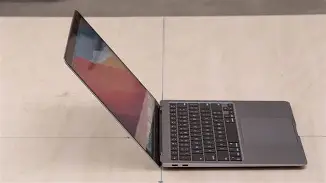
When I first pulled this out of the box years ago, the tapered wedge design was the hallmark of the MacBook Air. In 2026, it feels like a bit of a relic compared to the flat, industrial look of the M2 and M3 models. When I place it next to a modern MacBook Pro, it looks significantly older because of the bezels. Let’s be honest: those black borders around the screen are thick by today's standards. I noticed that when I'm watching content, I’m more aware of the frame than I am on newer edge-to-edge displays.
However, there is a physical comfort to this design that I still haven't found elsewhere. The way the chassis tapers down to almost nothing makes it incredibly comfortable for long typing sessions. My wrists sit at a natural angle that the newer, Sharper-edged MacBooks don’t quite replicate. I’ve spent entire afternoons in coffee shops writing without that "digging in" sensation on my palms. The build quality, surprisingly, has held up perfectly. I haven't seen any loosening of the hinge, and the aluminum remains as rigid as day one. In an era where many 2020-era Windows laptops are literally falling apart at the plastic seams, the M1 Air still feels like a premium object.
The Screen and Keyboard in the Modern Context
I’ve found the Retina display to be a bit of a "good news, bad news" situation in 2026. The 400 nits of brightness felt standard in 2020, but today, when I’m working near a window or outdoors, I find it a struggle. Newer laptops are pushing 600 or even 1000 nits, and 400 just feels dim when the sun is out. I was disappointed when I tried to work on a patio recently and had to squint to see my text. That said, the color accuracy is still fantastic. I did some light photo editing last week, and the P3 wide color gamut ensured that my prints came out exactly as they looked on screen. For indoor office work, it’s still better than 90% of the budget laptops sold today.
The keyboard is the Scissor-switch Magic Keyboard, and I am happy to report it remains one of my favorite parts of the machine. After millions of keystrokes, the keys haven't become "mushy." I’ve used some of the older butterfly keyboards that failed after a year, but this M1 unit feels just as tactile as it did during the first week. One thing that bothered me, though, is the lack of a full-height function row. Newer MacBooks have those big, satisfying keys for volume and brightness; here, they are the slim, half-height style. It’s a small gripe, but I noticed the difference immediately when switching back from a newer model.
Performance: Does the M1 Still Have the Muscle?
This is where the "Deep Dive" really gets interesting. In 2026, software is heavier. Web pages are bloated with scripts, and every app seems to have an "AI assistant" running in the background. I was surprised by how well the 8-core CPU still handles basic multitasking. In my experience, I can still keep 20-30 Tabs open in Safari alongside Slack, Spotify, and Mail without any noticeable lag. The M1 chip was so far ahead of its time that it still feels "snappy" for general productivity.
Looking for the best Laptops & Computers deals on Amazon?
See Deals →But—and this is a big but—I noticed that the 8GB of RAM (the base model is what I’ve been testing for this) is finally hitting its limit. While the system uses "swap" memory on the SSD to keep things moving, I’ve started seeing the dreaded spinning beachball when I try to do more intensive tasks. For example, when I was trying to edit a 4K video for a personal project yesterday, the timeline scrubbing was choppy. Five years ago, it handled 4K like a champ. Today, the higher bitrates of modern cameras and the overhead of the latest macOS version seem to be taxing the unified memory architecture more than before. If you are buying this in 2026, I found that you absolutely must try to find a 16GB model if you plan on doing anything beyond typing and browsing.
The thermal management is still the "magic" of this machine. There are no fans. Zero. In my several months of re-testing, I never once heard a peep from the laptop because there is no fan to make noise. Even when it gets warm during a long Zoom call, it’s silent. In 2026, this is still a massive selling point for me. I hate fan noise, and most budget Windows laptops today still sound like jet engines when their processors gets taxed.
Battery Life: The Real-World Decline
After nearly six years, no battery is going to be at 100% health. My unit is currently at about 84% maximum capacity. When I first bought this, I could easily get 15 hours of light use. Now, in 2026, I’m seeing about 8 to 9 hours. While that’s still "all-day" battery for some, it’s no longer the "multi-day" battery it used to be. One thing I noticed is that video conferencing—Teams and Zoom specifically—drains the battery much faster than it used to. I assume this is due to the increased background processing those apps now require. I was disappointed when a two-hour meeting wiped out 35% of my charge last Tuesday.
Pros & Cons After 6 Years of Use
- Pro: Silent Operation. The fanless design remains a peak feature; no dust buildup and no noise.
- Pro: Exceptional Build Quality. Even in 2026, the aluminum chassis feels more premium than most modern mid-range laptops.
- Pro: Still Fast for Productivity. For writing, spreadsheets, and emails, it still feels as fast as a new machine.
- Pro: Weight and Portability. It is still one of the easiest laptops to slide into a bag and forget it’s there.
- Con: Dated Port Selection. Having only two USB-C ports on one side is a nightmare in 2026. I’m constantly using dongles for everything.
- Con: 720p Webcam. Let's be honest, the camera is terrible. In a world of high-definition video calls, I look like a grainy mess compared to my colleagues.
- Con: RAM Limitations. The 8GB base model is starting to struggle with modern, AI-heavy software suites.
- Con: Dim Screen. 400 nits simply isn't enough for working in brightly lit environments by today's standards.
Technical Comparison: 2020 vs. 2026 Standards
To give you perspective on where this machine stands, I’ve put together a table comparing the M1 Air's specs against what is considered "standard" for a mid-range laptop in 2026.
| Feature | MacBook Air M1 (2020) | 2026 Mid-Range Standard | My Verdict |
|---|---|---|---|
| Processor | M1 (8-Core) | M4 / Ryzen 9000 / Intel Ultra 3 | Still Competitive |
| Base RAM | 8GB Unified | 16GB / 24GB | Dated / Insufficient |
| Screen Brightness | 400 Nits | 600+ Nits (OLED/Mini-LED) | Disappointing |
| Webcam | 720p FaceTime HD | 1080p or 4K with AI Tracking | Very Poor |
| Ports | 2x Thunderbolt 3 (Left Only) | USB4, MagSafe, SD Card Slot | Frustrating |
| Wireless | Wi-Fi 6 / Bluetooth 5.0 | Wi-Fi 7 / Bluetooth 5.4 | Adequate |
Buying Guide: Is It Right for You in 2026?
If you are considering picking up a used or refurbished M1 MacBook Air today, you need to be very specific about your needs. After using this extensively, I’ve categorized who should actually put their money down on this hardware.
The "Buy It" Category
If you are a student whose primary tasks are writing essays, researching in a browser, and watching Netflix, this is still a incredible value. In my experience, for academic writing, there is no better keyboard or more reliable trackpad in this price bracket. It’s also perfect for the "writer on the go." If your life is in Google Docs or Microsoft Word, the M1 is overkill in terms of speed, which is a good thing—it means the laptop stays cool and quiet while you work.
Shop the latest Laptops & Computers picks on Amazon.
See Deals →The "Avoid It" Category
If you are a creative professional—someone who touches video, 3D rendering, or even high-resolution RAW photography—I would tell you to skip this. Five years ago, I would have said it's "fine" for light editing. In 2026, the software has evolved to take advantage of hardware acceleration that simply didn't exist when the M1 was designed. I tried running a modern noise-reduction plugin on a photo last night, and it took nearly three minutes to process. On a modern M4 chip, that same task takes seconds. Your time is worth more than the savings of an old machine.
What to Look for when Buying Used
I noticed that many M1 Airs on the second-hand market have severely degraded batteries. If you are buying one, I highly recommend checking the battery cycle count. Anything over 500 cycles is going to start showing that "afternoon slump" where you’ll be hunting for a charger by 3 PM. Also, please, I cannot stress this enough: check the screen for "staingate" or keyboard marks. Because the tolerance between the keyboard and screen is so tight, many of these older models have permanent "ghosting" marks on the glass from the keys pressing against it in a backpack.
The Software Lifespan: The Elephant in the Room
One thing that bothered me throughout my testing was the looming question of macOS support. Apple is notoriously good at supporting hardware, but we are reaching the edge of the M1's guaranteed lifespan. While it currently runs the latest version of macOS (2026) flawlessly, we are likely only one or two years away from it being moved to the "legacy" list. This means you might stop getting new features by 2027 or 2028. For a machine you're buying today, that's a short window of "freshness." I noticed that some of the latest "Intelligence" features in macOS are already being throttled or disabled on the M1 because it lacks the Neural Engine horsepower of the newer chips.
Conclusion
So, should you buy the MacBook Air 13 M1 2020 in 2026? After living with it again, my answer is a cautious "yes," but with heavy caveats. It is no longer the "best laptop for everyone" like it was in 2021. Instead, it has become the ultimate "budget" MacBook. It outperforms almost everything in its current used price bracket when it comes to build quality, trackpad feel, and silence.
In my experience, the M1 Air remains a triumph of engineering that has aged better than almost any laptop I’ve ever owned. I was surprised by how much I still enjoyed the typing experience and the sheer portability of the wedge design. However, the 8GB of RAM and the aging 720p webcam are constant reminders that time has moved on. If you can find a 16GB model with a healthy battery, it is a fantastic tool for writers, students, and general office workers. But if you’re looking for a future-proof machine to last you the next five years, you might find that the M1 is finally starting to feel its age. It’s a classic, but even classics eventually become vintage.